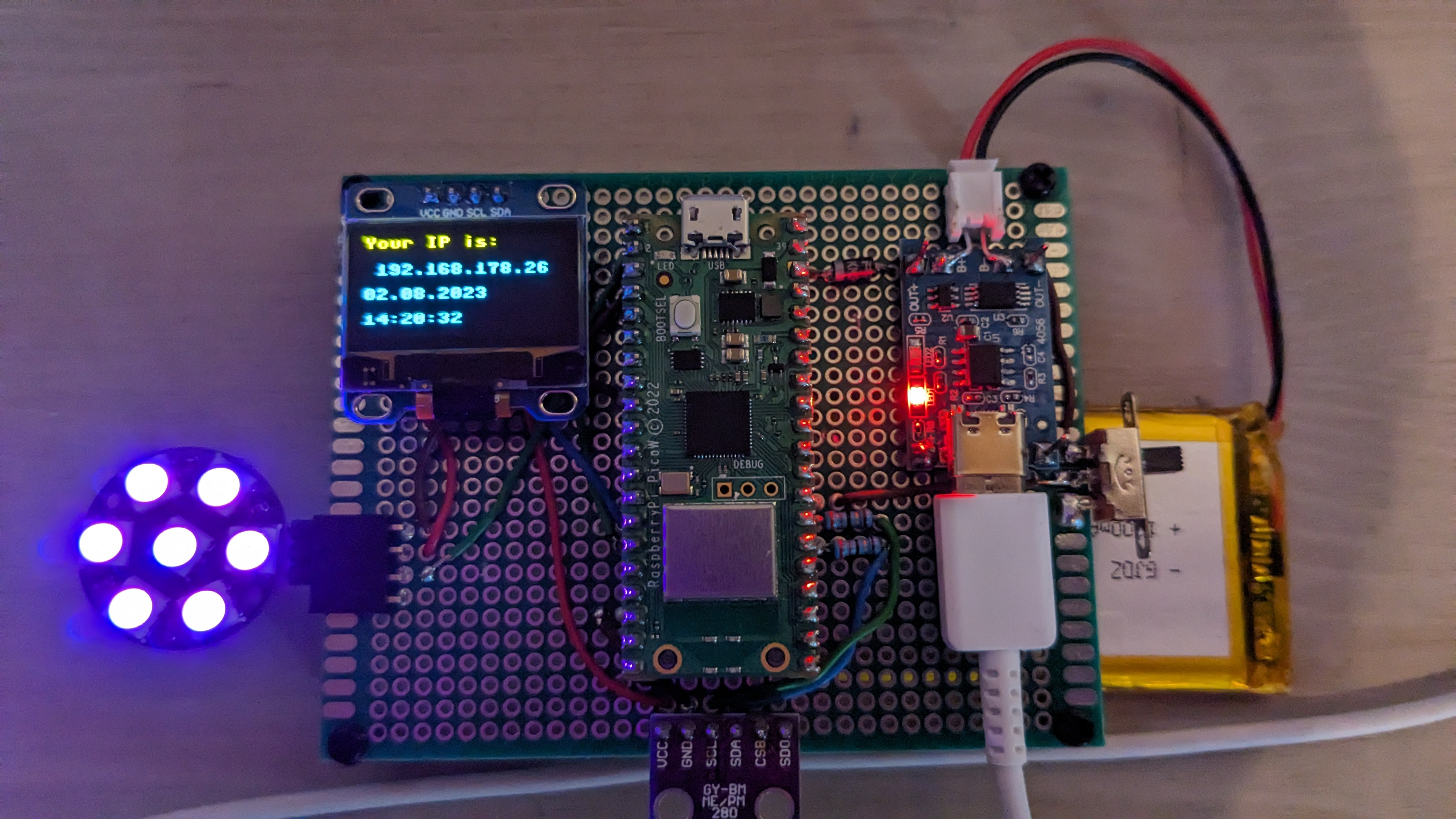
Jan. 24, 2024, 6:11 p.m.
Creating an Pico sensor testboard
One of the annoying things when working with microcontrollers is fiddling around with breadboard and jumperwires. Somtimes it works sometimes it doesn't. Especially when your selflearning it's extremly hard to figure out if you just messed up your code, or if maybe, one of those jumperwires isn't pluged in right. So to elimnate a small part of this problem I decided to build my own little teststation for some sensors, displays and led's that I commonly use.
What you need!
- Raspberry Pi Pico W
- WS2812B LED
- BMP 280 Temperature/Pressure sensor
- TP4056 LiPo Chargerboard
- 7x9cm Ciruitboard
- SSD1306 OLED Display
- 470uF Capacitor
- 2x 33 Ohm Resistors
- 1N4007 Rectifier Diode
- ON/OFF Switch
- Female Pin Header Strips
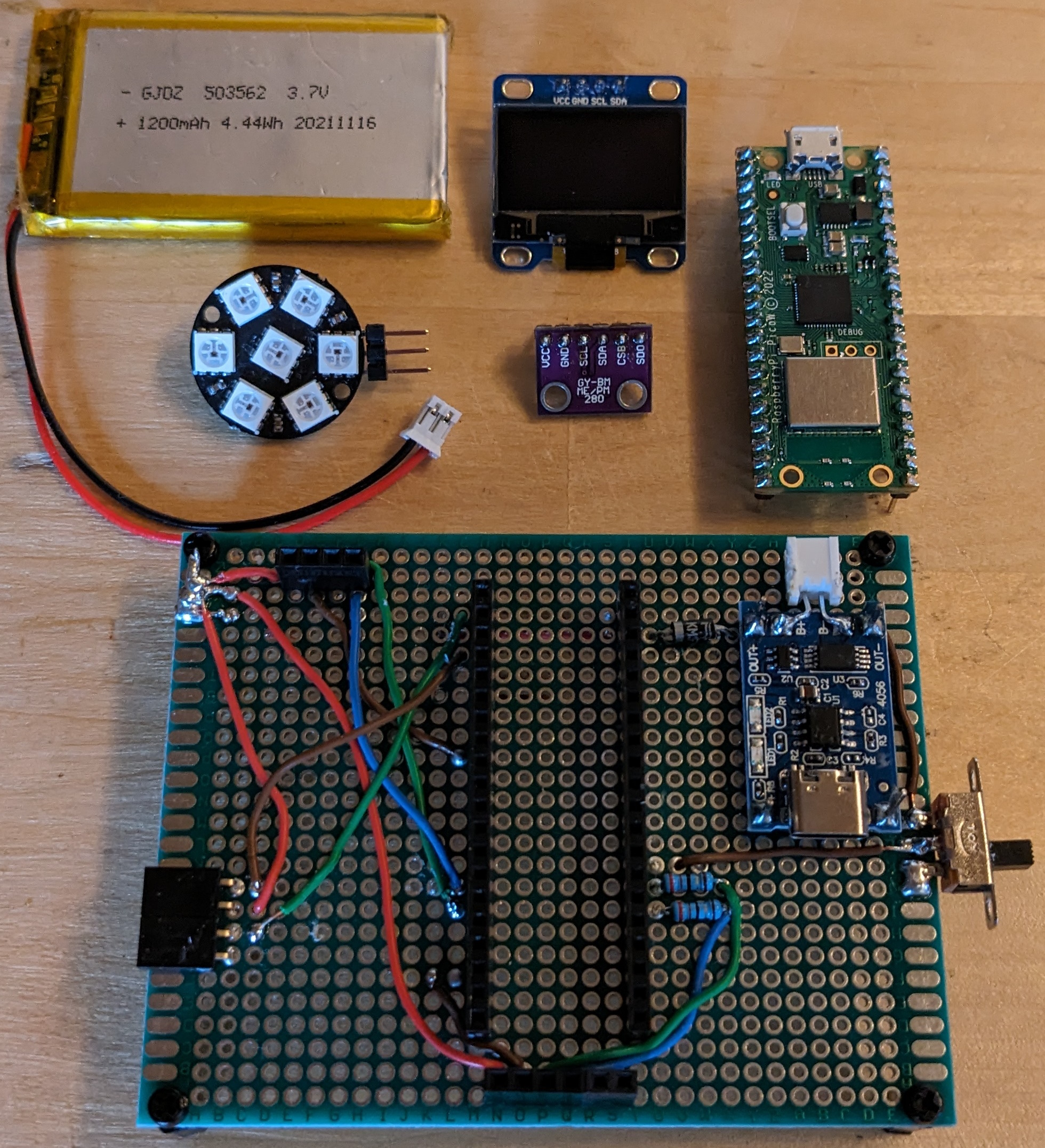
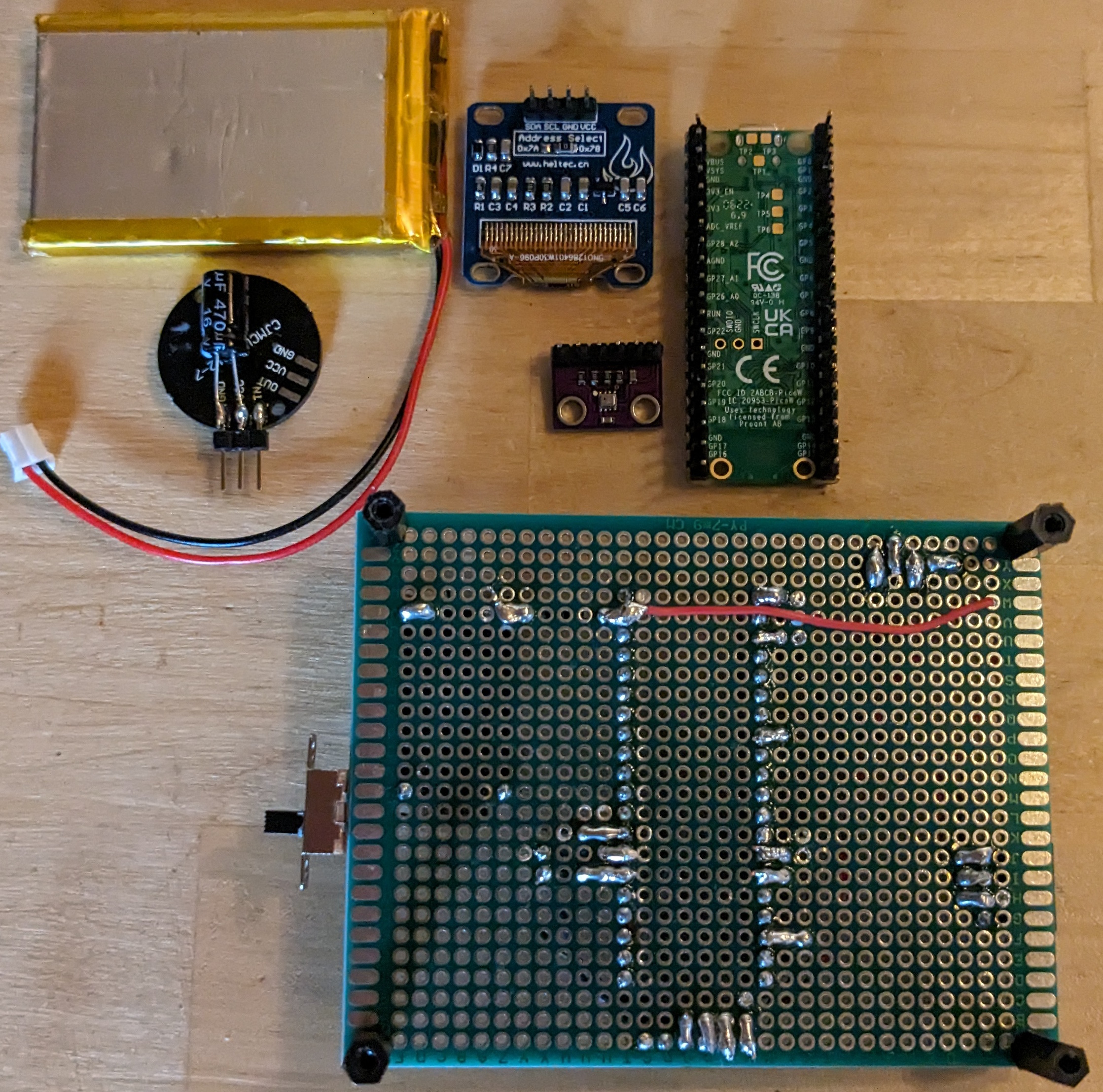
The 1N4007 is connected from the TP4056 module to the Pico VSYS pin, it's there so the current will only "flow" from the TP4056 to the board, and not the other way around when you connect the Pico via it's USB port to reprogramm it. I added the two 33 Ohm resistors because I was under the impression that the results from the BMP280 were somtimes jumping around to much, e.g. the one moment it's 22 degrees and sixty seconds later it' 22.5, even after hours of calibration, adding the resistors seems to have fixed that.
The 1200mAh LiPo battery takes around two hours from almost empty to full charge, and with the WS2812b turned on it last for almost exactly 24 hours.
The code you find below is my testcode for this project, it's a little bit chaotic, I know. But I'm still learning and for now I'm really happy that it is working as good as it does. As a self learner it is sometimes really hard to figure out the best way to implement something. Sometimes you sitting there for an hour just staring at the code and trying to figure out why something isn't working, that was perfectly fine the last the time you where working on the project. :) But that's part of the fun I guess.
What the programm does is, it prints the IP for the webpage under which you can controll your WS2812B LEDs on the little OLED-Display, it also shows the time/date. The "website" which is created shows the temperature from the BMP280, the date/time and some basic buttons to either turn the LEDs on, off or make them light up in a fancy color. Everythings pretty basic, but it works for me. Of course there is a little bit more going on in the background(fetching time from an NTP server or creating the http responses), but it just boils down to, print something on the lcd, get temperature from sensor and also make pretty lights that can be controlled from a webpage. 😉
    import machine
    import socket
    import network
    import sys
    import struct
    import rp2
    import time
    from lib import stuff
    from bmx280 import BMX280
    from lib import ssd1306
    from lib.neopixel import Neopixel

    i2c = machine.I2C(1, sda=machine.Pin(10), scl=machine.Pin(11))
    display = ssd1306.SSD1306_I2C(128, 64, i2c)

    # Pico Setup
    piLED = machine.Pin("LED", machine.Pin.OUT)

    # Neopixel setup
    numpix = 7
    strip = Neopixel(numpix, 0, 0, "RGB")
    strip.brightness(10)
    ledOn = (255, 255, 255)
    ledOff = (0, 0, 0)
    ledBunt = (0, 200, 255)

    # BMP280 I2C
    sda=machine.Pin(20)
    scl=machine.Pin(21, machine.Pin.OUT, machine.Pin.PULL_DOWN)
    i2c=machine.I2C(0,sda=sda, scl=scl, freq=400000)
    bus = machine.I2C(0, sda=sda, scl=scl)
    bmp = BMX280(bus, 0x76)

    # WiFi Setup
    wifiSSID = stuff.wifiSSID
    wifiPW = stuff.wifiPW
    rp2.country("DE")

    # Time Setup
    GMT_OFFSET = 3600 * 2
    NTP_HOST = 'pool.ntp.org'

    def wifiConnect():
        global netConfig
        wifi = network.WLAN(network.STA_IF)
        if not wifi.isconnected():
            print("Please establish WIFI connection")
            wifi.active(True)
            wifi.connect(wifiSSID, wifiPW)
            for i in range(10):
                if wifi.status() < 0 or wifi.status() >= 3:
                    break
                piLED.toggle()
                time.sleep(0.5)
        if wifi.isconnected():
            piLED.value(0)
            netConfig = wifi.ifconfig()
            print(f"Your IP is: {netConfig[0]}\n")
            return netConfig[0]
        else:
            print(f"No WIFI. Status is {wifi.status()} \n")
            return ""

    def serverStart():
        global server
        ipv4 = wifiConnect()
        if ipv4 != "":
            addr = socket.getaddrinfo(ipv4, 80)[0][-1]
            server = socket.socket()
            server.setsockopt(socket.SOL_SOCKET, socket.SO_REUSEADDR, 1)
            server.bind(addr)
            server.listen(1)
            print(f"Server is listening on {addr}")
    serverStart()

    def getTimeNTP():
        NTP_DELTA = 2208988800
        NTP_QUERY = bytearray(48)
        NTP_QUERY[0] = 0x1B
        addr = socket.getaddrinfo(NTP_HOST, 123)[0][-1]
        s = socket.socket(socket.AF_INET, socket.SOCK_DGRAM)
        try:
            s.settimeout(1)
            res = s.sendto(NTP_QUERY, addr)
            msg = s.recv(48)
        finally:
            s.close()
        ntp_time = struct.unpack("!I", msg[40:44])[0]
        return time.gmtime(ntp_time - NTP_DELTA + GMT_OFFSET)

    def setTimeRTC():
        global ds
        # NTP-Zeit holen
        ds = getTimeNTP()
        machine.RTC().datetime((ds[0], ds[1], ds[2], ds[6] + 1, ds[3], ds[4], ds[5], 0))
    setTimeRTC()

    def get_request_file(request_file_name):
        with open(request_file_name, "r") as file:
            file_requested = file.read()
        return file_requested

    def disp_update():
        datum = f"{ds[2]:02d}.{ds[1]:02d}.{ds[0]}"
        uhrzeit = f"{ds[3]:02d}:{ds[4]:02d}:{ds[5]:02d}"
        display.fill(0)
        display.text(("Your IP is: "), 0, 0, 1)
        display.text((f" {netConfig[0]} \n"), 0, 16, 1)
        display.text((f"{datum}"), 0, 32, 1)
        display.text((f"{uhrzeit}"), 0, 48, 1)
        display.show()

    disp_update()

    while True:
        # Update the value of cur_date on every request

        tim = machine.Timer(period=5000, mode=machine.Timer.ONE_SHOT, callback=lambda t:print(1))
        tim.init(period=1000, mode=machine.Timer.PERIODIC, callback=lambda t:disp_update())

        try:
            conn, addr = server.accept()
            print(f"HTTP request from {addr} !")
            request = conn.recv(1024)
            print(f"URL: {request}")
            request = str(request)
            request = request.split()

            # Update temperature and pressure
            pressure = bmp.pressure
            temperature = bmp.temperature

            cur_date = f"{ds[2]:02d}.{ds[1]:02d}.{ds[0]} - {ds[3]:02d}:{ds[4]:02d}:{ds[5]:02d}"
            # Update the HTML response
            html = f"""<!DOCTYPE html>
            <html>
                <head> <title> Pico Pic! </title> </head>
                <body>
                    <h1> Hallo tolle Welt! </h1>
                    <h2> {cur_date}
                    <p> Die momentane Temperatur ist: {temperature:>10.2f} Grad!
                    <h1 align="center">HiHo, what is going on?</h1><p align="center">What's up everybody?</p>
                    <p align='center'><b>Neopixel ausschalten</b> <a href='/index.html/light/off'><button>AUS</button></a></p>
                    <br>
                    <p align='center'><b>Neopixel anschalten</b> <a href='/index.html/light/on'><button>Normal</button></a></p>
                    <br>
                    <p align='center'><b>Neopixel bunt</b> <a href='/index.html/light/bunt'><button>BUNT</button></a></p>
                </body>
            </html>
            """

            # Create the HTTP-Response
            if ".html" in request[1]:
                file_header = "HTTP/1.1 200 OK\r\nContent-type: text/html\r\n\r\n"
                if request[1] == "/index.html/light/on":
                    strip.fill(ledOn)
                    strip.show()
                elif request[1] == "/index.html/light/bunt":
                    strip.fill(ledBunt)
                    strip.show()
                elif request[1] == "/index.html/light/off":
                    strip.fill(ledOff)
                    strip.show()
            elif ".css" in request[1]:
                file_header = "HTTP/1.1 200 OK\r\nContent-Type: text/css\r\n\r\n"
            elif ".js" in request[1]:
                file_header = "HTTP/1.1 200 OK\r\nContent-Type: text/javascript\r\n\r\n"
            elif ".svg" in request[1]:
                file_header = "HTTP/1.1 200 OK\r\nContent-Type: image/svg+xml\r\n\r\n"
            elif ".svgz" in request[1]:
                file_header = "HTTP/1.1 200 OK\r\nContent-Type: image/svg+xml\r\n\r\n"
            elif ".png" in request[1]:
                file_header = "HTTP/1.1 200 OK\r\nContent-Type: image/png\r\n\r\n"
            elif ".ico" in request[1]:
                file_header = "HTTP/1.1 200 OK\r\nContent-Type: image/x-icon\r\n\r\n"
            # serve index if you don"t know
            else:
                # doesnt send a header type if not extension not listed. In many cases the file will still load - but you may be better to look up the MIME type for the file and add to the above list
                file_header = ""

            response = html
            conn.send(file_header)
            conn.send(response)
            conn.close()

        except OSError as e:
            break
        except (KeyboardInterrupt):
            break

    try: conn.close()
    except NameError: pass
    try: server.close()
    except NameError: pass
    print("Server shut down")